Product Updates

Filter by partner ID now available

Partner banks can now filter by "Partner ID" within the Evaluation view and Review Queues in the dashboard.

Alloy now accepts an identifiers.external_partner_id field in the API that we associate with Partner Customers. Partner Customers can filter by Partner ID on the Review Queue, Evaluations page, and Entity page by clicking on the "+" icon on the filter list. This is our recommended best practice for all partners.

Filter by partner ID image
JSON image

New What-If user permission now available

Admins can now set a permission to allow users to run What-If Analysis but not save changes. To set this permission, go to Setting > Roles.

What If Permission


To learn more about the What-If Analysis feature, view our documentation here.

2 new string comparisons: "Contains" and "Does not contain"

2 new string comparisons now available: "Contains" and "Does not contain".

Prior to this we supported the following comparisons for strings:

  • equals
  • not equals
  • regex match
  • regex no match

"Contains" and "does not contain" are now available in this dropdown list. They are case insensitive.

SAML Single-Sign-On integration to the Alloy dashboard

Clients can now use their preferred identity provider to authenticate themselves into the Alloy dashboard, allowing users to seamlessly login in without creating or remembering a password for their Alloy accounts. To learn more, please see our full documentation.

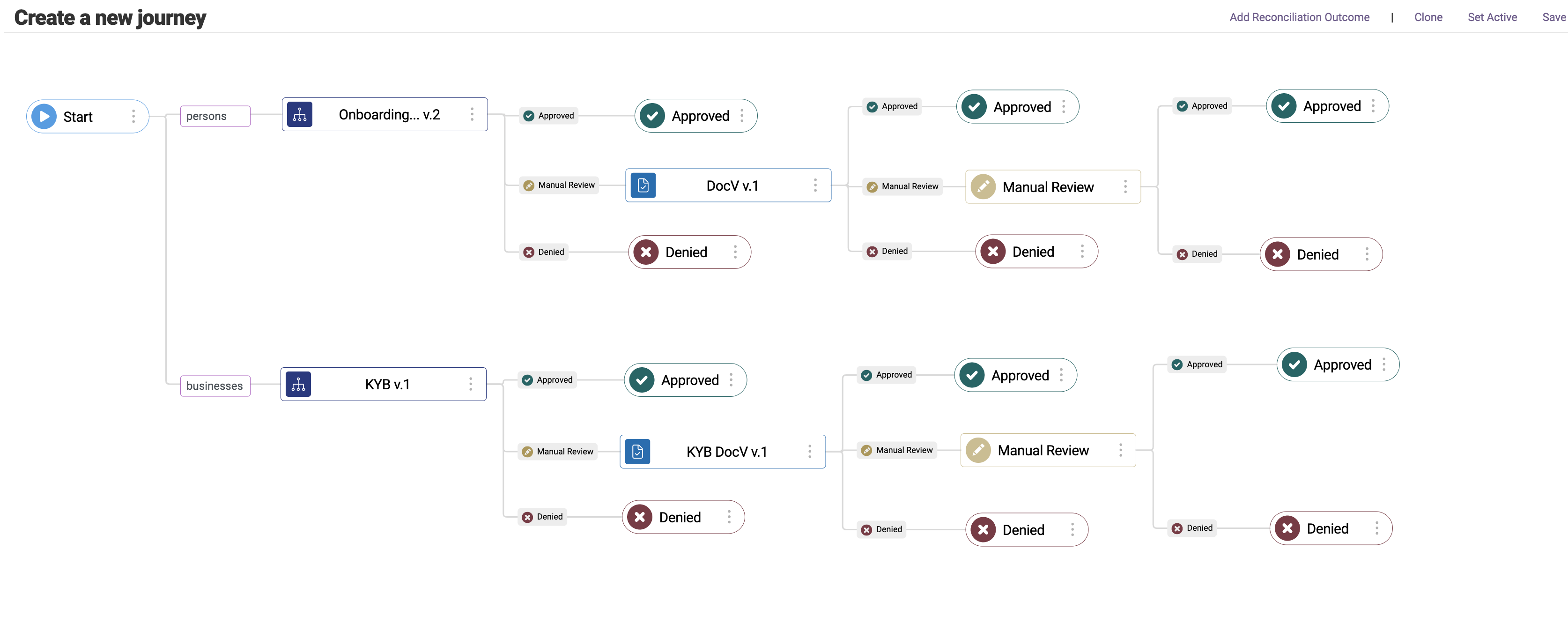
Simplify multi-workflow applications with Journeys

New Journeys feature is now available for all Alloy Credit Underwriting clients.

Journeys allow you to configure multi-step and multi-workflow applications using a single configuration and endpoint. When a request is made to the Journey endpoint, Alloy will automatically make requests to the individual workflows or steps within the configured Journey on your behalf and update the application state throughout the lifecycle.

To learn more about Journeys, please view our documentation here and read our blog.

Journeys

Calculate APR and credit line assignment values with a decision matrix

Credit Underwriting clients can now use a decision matrix to calculate values.

Clients were previously required to use tags, output attributes and custom models to calculate values such as APR and credit line assignments. To reduce complexity and implementation time, we are introducing the first iteration of matrix models which allow clients to use a 2-dimensional grid or matrix to calculate values such as APR or credit line assignments.

A decision matrix or grid is a list of values in rows and columns that allows our clients to systematically identify, analyze and rate the performance of relationships between sets of values and information.

Matrix models example


Sandbox personas no longer case sensitive

The last name identifier field for sandbox personas is no longer case sensitive. This will make it easier to run sandbox personas whether or not the last name is capitalized.

Search workflow list by workflow name

You can now search for a workflow by name from your workflow list. Simply type the name of the workflow you are looking for in the search bar.

Back