Updated Features

Investigation Review Enhancements

We’ve redesigned Alerts within Investigations to help your team move faster, stay focused, and take action with confidence.

  • See what matters, faster
    A cleaner, more intuitive layout makes it easy to follow both simple and complex alert journeys. Key steps—like Actions, Routers, and Recon—are now easier to spot so your team can quickly understand what’s happening.
  • Simplified timeline for quicker decisions
    The new timeline view reduces visual clutter and clearly aligns statuses, helping you scan alerts and make decisions more efficiently.
  • Works seamlessly across your setup
    Improved responsiveness ensures a consistent experience across different screen sizes and resolutions.
  • Handle more complex cases with ease
    With support for Multi-Entity Alerts, you can investigate cases involving multiple entities in a single, unified view.

Fraud Signal: Enhanced Agent Experience

Screenshot 2026 04 03 at 10 24 59 AM

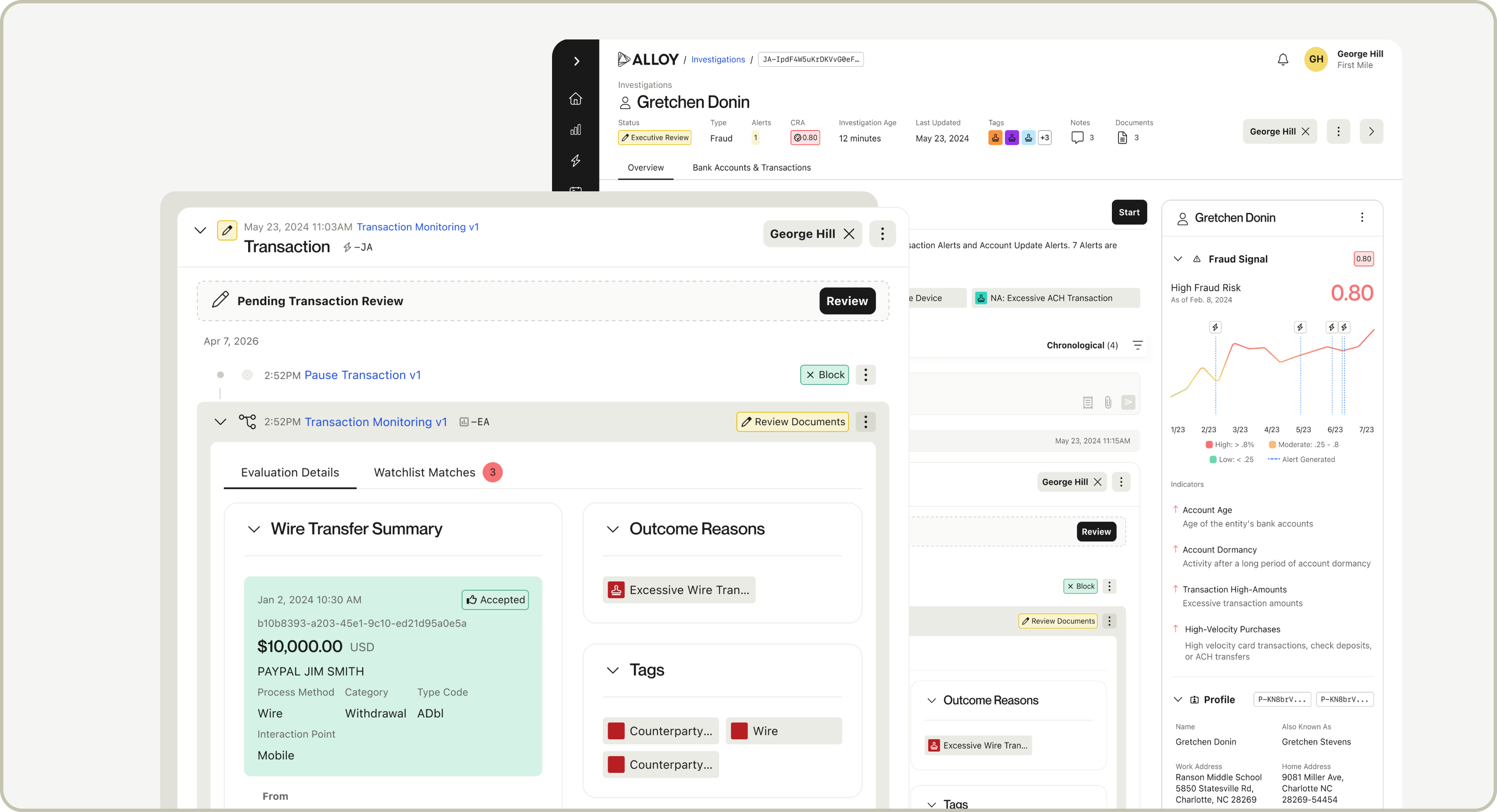
We’ve improved Fraud Signal Indicators to make them more precise and actionable. Indicators have always existed—now they’re generated and surfaced at the individual evaluation level, giving you clearer insight into why each score was produced.

What’s new

  • See the top drivers behind each specific Fraud Signal evaluation on Alerts and Investigations
  • View an entity’s current score and latest indicators directly in the entity panel
  • Explore a full history of evaluations with a timeline view of how risk has changed over time
  • Click into indicators for clear explanations of each signal

API update

  • Indicators can now be retrieved in the Fraud Signal payload (available to all clients)
  • Adds a small amount of latency (~100ms on average)

Why it matters
This update makes Fraud Signal more transparent at the moment decisions are made. Instead of a single, static set of reasons, you now see exactly what drove each evaluation—helping teams move faster, stay consistent, and trust the system without relying on rules.


Document Review Updates


We’ve introduced improvements to the Documents experience for those using Alloy's SDK to make reviewing and managing documents faster and more efficient.

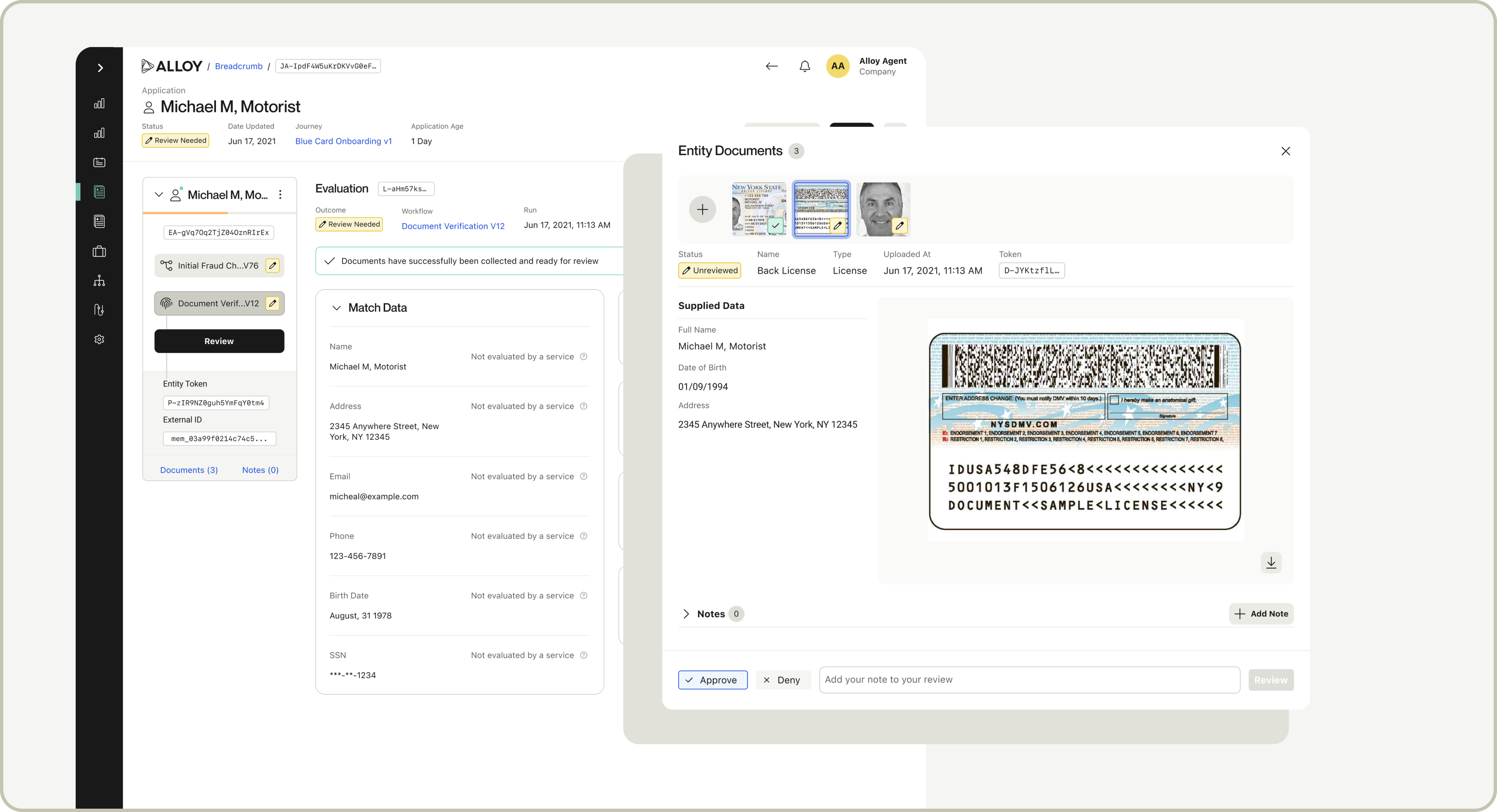
if you’re using Alloy's SDK with one of the supported plugins below, you can now launch Entity Documents directly from the document evaluation page from a banner at the top of the page.

When you open the documents modal from an evaluation, any supplied data (if available) will now appear alongside the document, allowing you to easily compare document details with the supplied information.

Supported Plugins

This side-by-side comparison and banner is currently supported for the following plugins:

  • Veriff
  • Persona
  • Sumsub
  • Onfido
  • Prove
  • Socure DV
  • Incode
  • Vouched
  • Alloy Multi-Document Collection

Additionally we have added the ability to upload documents directly within the document window—no extra steps required. Once uploaded, your documents will automatically appear at the front of the document navigation, making them easy to find and access right away. This is available for all Applications and Investigations users. 

Build workflows faster with custom snippets in your account-level Policy Library

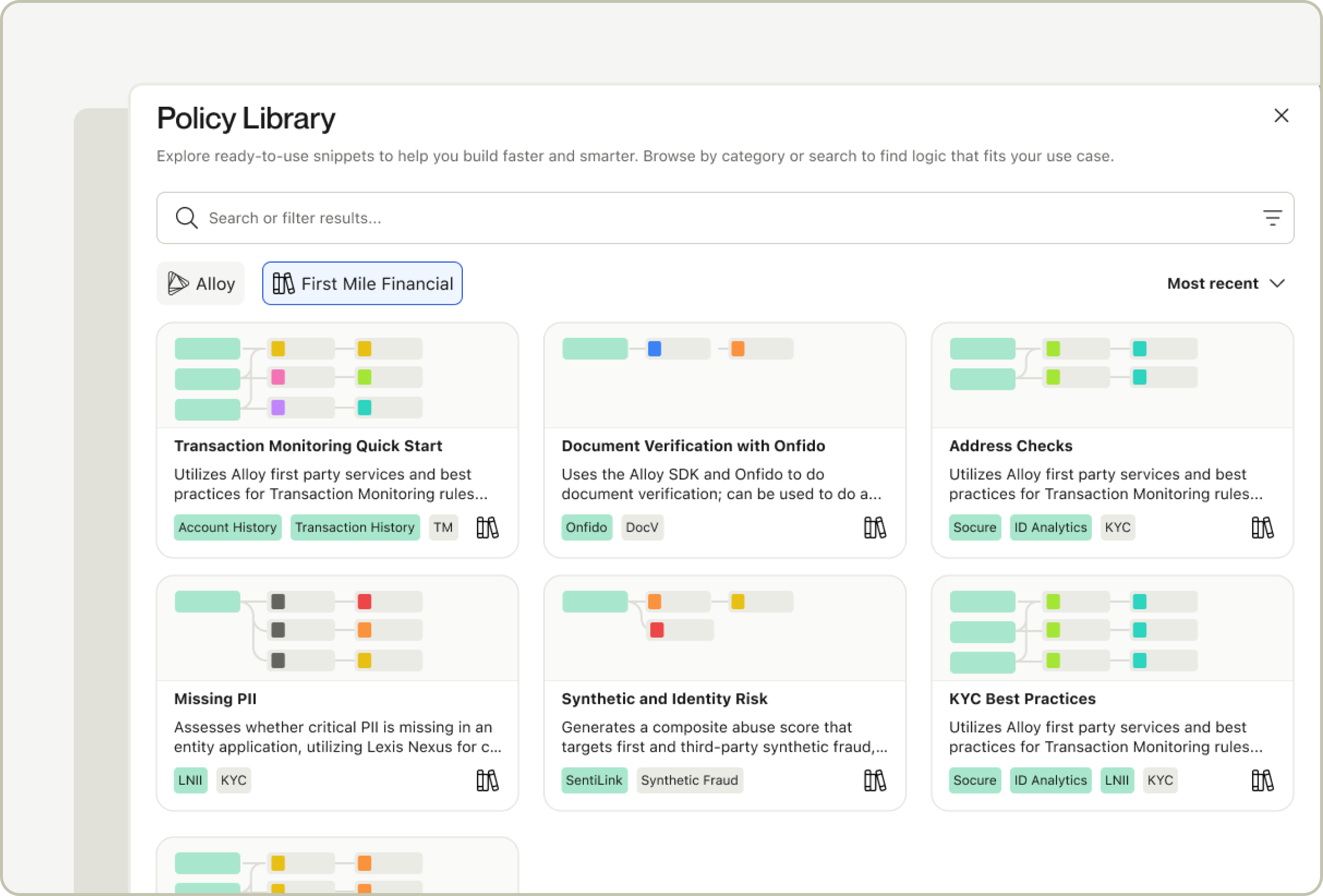
Our new Policy Library feature lets you create, save, and reuse your own snippets, or modular blocks of workflow logic. A new tab offers an account-specific repository for custom decisioning snippets, making it easy to standardize logic, modularize workflows, and build faster as your policies evolve.

With this feature, you can:

  • Create and reuse your own policy snippets: Save commonly used logic once and reuse it across workflows within your account (the ability to publish snippets is configurable by role permission).
  • Standardize decisioning internally: Ensure teams are building from the same trusted logic, reducing inconsistencies and rework.
  • Browse and search with ease: Quickly find snippets by name or use case directly from the Alloy workflow editor.
  • Deploy with confidence: Similar to Alloy-created snippets, you can insert snippets into workflows with guided merge logic and preview before setting live.

With Alloy’s ongoing investment in self-service capabilities, the Policy Library offers a single place to access both Alloy-recommended logic and your organization’s defined policies. 

You can find more details in this help article

Removing Empty Data Cards in Reviews

We’ve improved the evaluation review experience by automatically hiding cards that don’t contain any data. This keeps Evaluations focused on meaningful results and makes them easier to review at a glance.

Some cards will continue to appear even when no data is returned, as they provide important context or configuration access. For a full breakdown of which cards are always shown versus conditionally hidden, please refer to our documentation.

Rule Explainability navigator

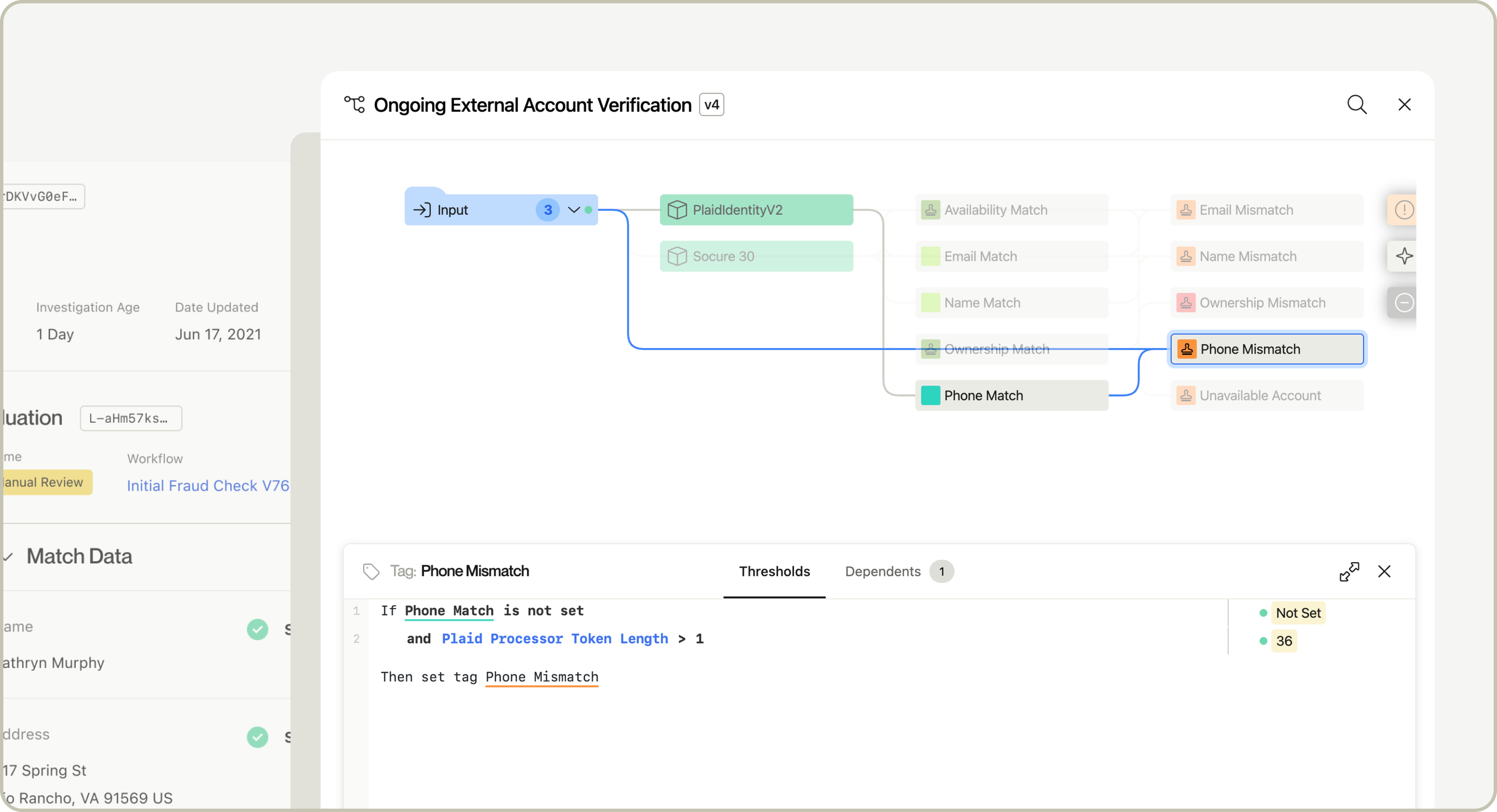
View more context on an Evaluation in a new expansion on Rule Explainability with the Workflow Navigator. Users now have the ability to navigate the Workflow in a read-only view and see the Tags, Outcomes, and Rules that have been set for the Evaluation. Through the Navigator, users see context on Services, Inputs, Outputs, Published Attributes, and Matrix Models to help them better understand the Evaluation Rules and Outcomes.

With this release, users are able to:

  • Understand the dependencies between Tags, Services, Published Attributes, and other configuration components for a given Evaluation
  • View the Workflow outputs that have been set or not set based on the logic
  • More effectively troubleshoot an Evaluation by traversing the Workflow and identifying the thresholds that were triggered
  • Gain insights into areas of their policies that could be optimized or improved with additional Tags or logic

Custom Outcomes

Custom outcomes

Alloy now supports custom Outcomes in Workflows and Journeys, which gives users the ability to tailor Outcome names, colors, and icons to better align to your organization’s risk review protocols and provide the right context for Evaluations, Applications, Alerts and Investigations. In addition, you can now add a characteristic to your Outcome letting Alloy know if the Outcome was good, bad, or neutral.

Here's what you should know:

  • Any existing or new custom Outcomes can be tailored in Settings
  • Preview how the customized Outcome will appear throughout the platform during creation
  • View the Workflows and Journeys where an Outcome is actively being used in our enhanced Outcome Settings Page

View unevaluated entities on the Entities page

Clients can now view all entities that were evaluated, were processed through a portfolio evaluation, or were not evaluated but may have been passed on through the Events API or legacy Entities API (for example: if the entity was onboarded outside of your Alloy instance and/or there has been no associated activity that has since triggered an alert, that entity would be considered ‘unevaluated’). Previously, the Entities page only displayed entities that had undergone a real-time evaluation.

Additionally, for clients using portfolio workflows, the Entity Detail page now displays a list of portfolio evaluations that the entity has been shortlisted in. These updates enable Alloy to serve as the single source of truth, providing teams with complete visibility into all the entities in their portfolio and allows them to take action on these entities in the future (e.g. create an investigation on that entity).

Back